Performance is key when it comes to maximizing your PC's capabilities, and adopting a liquid cooling system can significantly elevate your gaming or workstation experience. By efficiently dissipating heat, these systems help maintain optimal temperatures, allowing your hardware to function at peak efficiency. You'll benefit from improved stability during intense tasks, extended hardware lifespan, and reduced noise levels compared to traditional air cooling. Investing in a liquid cooling solution not only enhances your PC's performance but also safeguards your components for long-term reliability.
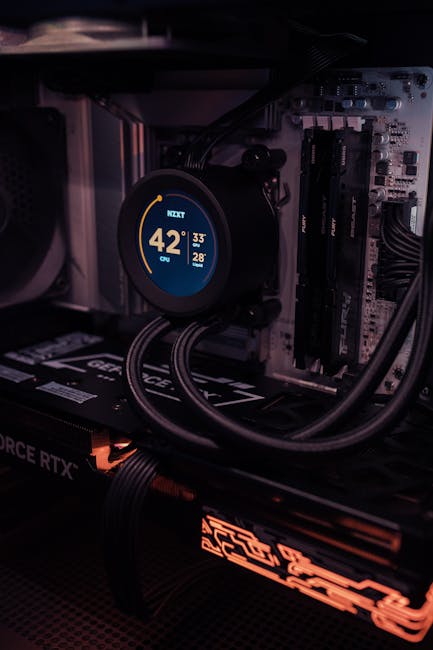
Key Takeaways:
- Improved thermal efficiency allows for higher performance levels and better overclocking capabilities.
- Consistent temperature control reduces the risk of overheating, ensuring stable operation during intensive tasks.
- Enhanced hardware longevity is achieved by lowering operating temperatures, minimizing wear and tear on components.
Understanding Liquid Cooling Systems
Liquid cooling systems utilize a coolant, typically water, to transfer heat away from your computer's components. Unlike air cooling, which relies on fans blowing air, liquid cooling circulates fluid to efficiently dissipate heat, allowing for optimal performance without overheating. You benefit from lower temperatures, which directly contribute to improved system stability and longevity.
How Liquid Cooling Works
In a liquid cooling setup, a pump circulates coolant through a closed loop that includes a CPU or GPU water block, a radiator, and fans. The water block absorbs heat from the component, transporting it to the radiator where it is cooled down by airflow from the fans. This effective heat exchange process maintains lower temperatures, enhancing your system's performance.
Types of Liquid Cooling Solutions
There are two primary types of liquid cooling solutions: all-in-one (AIO) units and custom loops. AIO units are pre-assembled and easier to install, providing reliable cooling for most builds. Custom loops offer greater flexibility and performance but require more technical knowledge and initial setup time. Each type has its unique benefits tailored to different user needs.
| Type of Solution | Description |
| AIO (All-in-One) | Compact, easy to install, comes pre-assembled. |
| Custom Loop | Highly customizable, allows for optimized cooling performance. |
| Closed Loop | Sealed system, low maintenance required. |
| Open Loop | Involves a reservoir, offers extensive customization. |
| DIY Kits | Provides components to create your own cooling system. |
Choosing the right type of liquid cooling solution impacts your overall PC performance and cooling efficiency. AIO systems are ideal for users seeking a straightforward approach, while custom loops cater to performance enthusiasts wanting to control every aspect of their setup. Each option suits varying skill levels and cooling demands, giving you flexibility in your build.
- Any system you choose should align with your performance needs and comfort level in setup.
| Key Features | Benefits |
| Noise Level | Generates less noise compared to traditional air cooling. |
| Cooling Efficiency | More effective at heat dissipation. |
| Space Utilization | Can be more compact, saving space in your build. |
| Temperature Control | Maintains stable temperatures for overclocking. |
| Visual Appeal | Offers aesthetic customization options with RGB components. |
- Any enhancements you implement should match your specific cooling requirements and personal aesthetic preferences.
Enhanced PC Performance
By utilizing a liquid cooling system, you can significantly elevate your PC's performance with improved thermal efficiency. This technology allows your components to operate at optimal temperatures, enabling higher clock speeds and overall system responsiveness. Enhanced cooling capabilities often result in smoother gameplay and more efficient multitasking. For a deeper understanding, explore Water Cooling For PC Performance and Longevity.
Overclocking Capabilities
Liquid cooling allows you to push your hardware to its limits through overclocking, as it efficiently dissipates heat generated by high-performance components. This capability leads to increased frame rates and faster processing times without the risk of overheating.
Reduced Thermal Throttling
With liquid cooling, your system experiences less thermal throttling, allowing for sustained performance during heavy workloads. This consistency is vital in gaming and demanding applications, as it keeps your PC running at optimum effectiveness even under stress.
Thermal throttling occurs when your CPU or GPU reduces performance to prevent overheating, which can negatively impact your gaming and productivity experience. Liquid cooling systems combat this issue by maintaining lower temperatures, ensuring that your components stay cool even during intense gaming sessions or heavy computational tasks. As a result, you can enjoy uninterrupted performance and longevity, as overheating-related issues often lead to premature hardware failure. With constant temperature regulation, you can maximize your hardware's potential without sacrificing performance for thermal safety.
Superior Temperature Control
Liquid cooling offers advanced temperature regulation, significantly enhancing your PC's performance. With a cooling fluid that efficiently transfers heat away from critical components, you can enjoy lower operational temperatures, reducing thermal throttling. This not only creates a more stable system while gaming or rendering but also prolongs the lifespan of your hardware, ensuring reliability during intensive tasks.
| Benefit | Description |
| Lower Temperatures | Maintain optimal temperatures for CPU and GPU under load. |
| System Stability | Reduction in thermal throttling leads to smoother operation. |
| Extended Hardware Lifespan | Lower heat levels can prolong the life of components. |
Efficient Heat Dissipation
With a liquid cooling system, heat is rapidly dissipated away from critical components, thanks to the high thermal conductivity of the coolant. This efficient method allows your CPU and GPU to maintain lower temperatures even during extreme workloads, allowing for peak performance without overheating, which is necessary for gamers and creators alike.
Comparisons with Air Cooling
When comparing liquid cooling to air cooling, several differences emerge. Liquid cooling systems often outperform air coolers by maintaining lower temperature ranges, particularly during intensive tasks. While air cooling might suffice for standard setups, liquid cooling's efficiency shines in overclocking scenarios or high-performance builds. The noise generated by fans in air cooling may also exceed the more silent pump operations found in liquid systems, providing a quieter overall experience.
| Aspect | Overview |
| Temperature Control | Liquid cooling generally offers better thermal performance. |
| Noise Levels | Liquid systems tend to operate quieter than air cooling setups. |
| Installation Complexity | Liquid cooling requires more installation effort compared to air cooling. |
Impact on Hardware Longevity
Your components thrive in an environment where temperatures remain regulated. Liquid cooling systems minimize thermal stress on critical hardware, thus significantly enhancing longevity. By efficiently dissipating heat, these systems reduce the chances of thermal throttling and component failure, enabling your PC to run smoothly over the years. This not only means fewer repairs but also a more reliable and sustained performance level.
Prevention of Overheating
Overheating can lead to immediate and long-term damage to your components. With a liquid cooling system, you ensure that temperatures stay consistently low, effectively preventing your CPU and GPU from reaching critical thermal thresholds. This stability enables enhanced performance and protects your investments over time.
Extended Component Lifespan
By keeping temperatures in check, liquid cooling systems notably extend the lifespan of your hardware. Components that frequently operate at high temperatures experience stress that can lead to premature failure. You effectively bolster the durability of your CPU, GPU, and even RAM, fostering a more resilient overall system that can adapt to demanding tasks for a more extended period.
Components subjected to consistent high temperatures may degrade faster, increasing the likelihood of malfunctions. In contrast, effective cooling solutions allow your hardware to maintain optimal operating conditions, minimizing wear and tear. Studies show that electronic components can last up to 50% longer when kept at ideal temperatures, meaning that a liquid cooling investment pays off by delaying upgrades and repairs. This longevity leads to a more cost-effective and sustainable computing experience, ensuring that your system can tackle new applications and games for years to come.
Installation and Maintenance Considerations
Installing a liquid cooling system requires careful planning and attention to detail. Make sure to choose compatible components, such as a suitable case, radiator size, and pump capacity, to ensure optimal performance. It's vital to route tubes properly to avoid any awkward bends and potential kinks, which could lead to reduced flow rates or leaks. Having the right tools and workspace will facilitate a smoother installation process.
Setting Up a Liquid Cooling System
To set up a liquid cooling system, start by assembling your components, including the pump, reservoir, radiator, and water blocks. Carefully mount the water blocks onto your CPU and GPU, applying thermal paste as needed. Secure the radiator in your case and connect the tubing for the coolant flow, ensuring there are no sharp bends. Finally, fill the system with coolant and run a leak test before powering on your PC.
Routine Maintenance Tips
Routine maintenance of your liquid cooling system is important for long-term performance. Regularly check the coolant levels and refill as needed, ensuring that your components remain adequately cooled. You should also inspect the tubing for any signs of wear or discoloration, as these can signal deterioration. Cleaning the radiator and reservoir helps prevent dust buildup, which can impede airflow and cooling efficiency. The
- Check coolant levels every few months.
- Inspect tubing for wear and replace if necessary.
- Clean radiator and reservoir to prevent buildup.
- Ensure pump is functioning properly.
Monitoring your system ensures it operates at peak efficiency. It's important to replace the coolant every 6 to 12 months, depending on the type used. When flushing the system, use distilled water and compatible cleaning solutions to avoid any chemical reactions. Regular maintenance not only enhances performance but also extends the longevity of your hardware. The
- Schedule a full system flush annually.
- Monitor temperatures with software tools.
- Keep fans and radiators dust-free.
- Test pump functionality during maintenance checks.
Common Misconceptions
Misunderstandings about liquid cooling systems can deter potential users from considering this effective solution. Many people believe that liquid cooling is overly complicated and only for extreme gamers or professionals, ignoring the fact that it’s beneficial for a wide range of users. The perception that liquid cooling systems are prone to leaks or require constant monitoring also adds to the hesitation. For accurate insights, check out Boost Your Game: Superior Liquid-Cooled PCs.
Debunking Myths about Liquid Cooling
A common myth is that liquid cooling systems are complicated to install and maintain, which is often overstated. Most modern setups are designed for user-friendliness, with straightforward installation guides and all-in-one solutions that simplify the process. Additionally, misconceptions about the cooling performance can result in missed opportunities for thermal efficiency, as liquid cooling consistently outperforms air cooling in power-intensive tasks.
Addressing Concerns about Leaks and Damage
Concerns about leaks and damage are prevalent when considering liquid cooling. However, modern systems incorporate high-quality materials and designs rigorously tested to minimize these risks. Internal components are sealed effectively, and many systems feature fail-safes to prevent leaks from causing damage to your hardware.
While the fear of leaks is understandable, it’s important to note that liquid cooling systems are engineered with leak prevention in mind. High-grade tubing, secure fittings, and low-permeation materials are standard in the latest designs. Manufacturers often offer warranties that cover potential issues, reflecting their confidence in the reliability and durability of these systems. Regular checks and maintenance can further ensure your system remains in top condition, giving you peace of mind as you enjoy the improved performance benefits.
Conclusion
As a reminder, adopting a liquid cooling system significantly boosts your PC’s performance, ensures optimal temperature control, and extends the longevity of your hardware. By effectively dissipating heat, these systems allow your components to operate efficiently, leading to better overall performance and stability. With enhanced cooling, you can push your hardware to its limits without the risk of overheating. Investing in a liquid cooling solution is a smart decision for any serious PC user looking to maximize their system's capabilities and lifespan.
FAQ
Q: What are the primary benefits of a liquid cooling system for PC performance?
A: A liquid cooling system enhances PC performance by efficiently dissipating heat, allowing for higher overclocking potential and maintaining optimal operating temperatures, which results in improved system responsiveness and stability during intensive tasks.
Q: How does a liquid cooling system improve temperature control compared to air cooling?
A: Liquid cooling operates with increased heat transfer efficiency, enabling better temperature control. It circulates coolant through a closed loop, absorbing heat from crucial components like the CPU and GPU, while exhausting it away more effectively than air cooling systems.
Q: In what ways does liquid cooling contribute to hardware longevity?
A: By maintaining lower operating temperatures, liquid cooling minimizes thermal stress on components, reducing the risk of overheating and thereby increasing the lifespan of hardware such as CPUs, GPUs, and other critical parts of the system.
Q: Are there any performance differences in gaming with a liquid cooling system?
A: Yes, liquid cooling provides stable and consistent temperatures during gaming sessions, allowing for sustained high performance without throttling. This results in higher frame rates and smoother gameplay, especially in demanding titles.
Q: Can a liquid cooling system be beneficial for noise reduction in PCs?
A: Liquid cooling systems can significantly reduce noise levels compared to traditional air coolers because they often employ larger fans running at lower speeds, producing less sound, while maintaining effective cooling performance.


 Posts
Posts


0 Comments